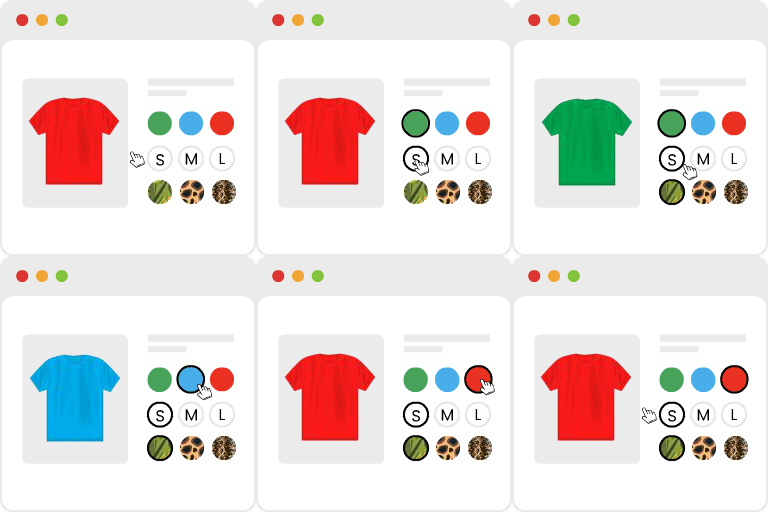
Make WooCommerce variations easier to choose
Variation Swatches for WooCommerce Premium transforms standard WooCommerce variation dropdowns into a more visual selection experience. Customers can choose colors, sizes, styles, and other options through interactive swatches instead of opening separate text-based menus.
The plugin supports color, image, button or label, and radio-style swatches. Different attributes can use different display types on the same product, such as color swatches for color choices and buttons for sizes. This helps shoppers understand available options more quickly while keeping product pages organized.
Premium features for a more flexible catalog
- Image tooltips: Show an image when a customer hovers over a swatch, adding visual context without placing extra content directly on the page.
- Catalog and archive swatches: Display swatches on shop, category, and archive pages so customers can interact with product choices before opening an individual product page. You can show all attributes or one selected attribute and adjust swatch size and alignment for archive layouts.
- Custom product-level attributes: Create swatches for attributes added directly to an individual product, including one-off options that are not shared across the catalog.
- Radio button swatches: Present variation choices as radio-style selectable buttons when a structured form-like layout suits the store design.
- Product-level shape overrides: Use round or square swatches globally, then override the shape for individual products when needed.
- Out-of-stock styling without the free-version limits: Cross out, blur, or hide unavailable swatches. Premium removes the variation limit and the requirement to enable WooCommerce’s catalog setting for hiding out-of-stock items.
Useful controls for product pages
Store-wide settings let you adjust swatch size on single product pages without editing a theme or writing custom CSS. Text tooltips can provide names or descriptions on hover, while the selected variation name can appear beside the attribute label, such as “Color: Ocean Blue.” This gives customers a clear confirmation of their current selection.
Swatches can also be generated from a variation’s featured image when one is available. Color names can be matched automatically, and the exact shade can still be refined afterward. If a swatch layout is not suitable for a particular attribute, it can be returned to the standard WooCommerce dropdown without losing the existing attribute terms or values.
Practical store workflows
Use image swatches for products where appearance matters, color swatches for shade-based choices, and buttons or radio swatches for sizes and structured options. Archive swatches are useful for stores with large product grids, while out-of-stock styling helps shoppers recognize unavailable choices during selection.
The plugin also supports Quick View swatches when the theme or Quick View implementation is compatible, allowing customers to choose options from shop or archive-page popups.
Installation
- Install and activate the plugin.
- Go to Products > Attributes and select an attribute type such as Color, Image, Button/Label, or Radio.
- Edit the attribute terms and assign the relevant color, image, or label.
- Save the settings and review the swatches on your product pages and catalog layouts.