Expand your WordPress editing options
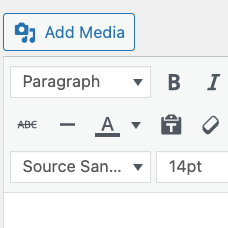
Fonts Pro adds more control to the WordPress visual editor by providing additional font and size choices. It is designed for users who want to format content directly from the editor instead of relying only on the default options available there.
The paid edition also lets you add your own selection of Google and custom fonts, including premium fonts, to the editor. This gives you a more flexible way to prepare text for pages and posts while keeping font choices available within the editing interface.
Editor controls at a glance
Fonts Pro adds two drop-down menus to the visual editor:
- Styles: access the available style choices from the editor.
- Sizes: select from additional text sizes while formatting content.
These controls are intended for practical, in-editor formatting. Whether you are preparing a page, writing a post, or adjusting text before publication, the added menus keep the relevant options close to the content you are editing.
Use your selected fonts
With Fonts Pro, you can add a selection of Google and custom fonts to the editor. The paid edition also supports adding premium fonts, allowing your editing environment to include the typefaces you choose for your WordPress content.
This can be useful when different parts of a site require different text treatments or when the standard editor choices do not cover the fonts you want to use. Once your selection is available in the editor, you can choose from those options while working with content.
Gutenberg support
Fonts Pro includes support for Gutenberg and works with the latest version of Gutenberg identified in the product information. This makes the paid edition relevant for WordPress sites using the Gutenberg editing experience alongside the visual editor controls supplied by the plugin.
Typical workflow
- Open the WordPress editor for the content you want to prepare.
- Use the Styles and Sizes drop-down menus to adjust available formatting choices.
- Add your selected Google, custom, or premium fonts through the Fonts Pro options.
- Choose the appropriate font and size while editing your content.
The result is a more adaptable editing setup for sites that need additional typography choices available during content preparation.
Getting started
Install the Fonts plugin and upgrade to Fonts Pro to access the paid font selection features. After the Pro edition is available, configure the Google, custom, and premium fonts you want to use, then return to the WordPress editor to work with the added font, style, and size controls.
Fonts Pro provides a focused way to extend editor typography without changing the purpose of the WordPress editing workflow.